For auditors and reviewers
How the proof works
This page explains what a PolicyGate record contains, how it is signed, chained and timestamped, and how to check it yourself without access to PolicyGate.
Live today: a public reference deployment, with a demo and a console you can open.
What a record contains
Every policy decision on an AI call or an agent payment, allowed or denied, and every admin change becomes one record. A record holds:
- Decision type
- An AI call at the edge, an agent payment, an admin change, an export or an anchor.
- Outcome and reasons
- Allowed or denied, with machine-readable reasons such as a model that is not on the allow-list.
- Policy version
- The revision of the signed policy bundle that made the decision.
- Tenant and subject
- Who made the call. Both come only from the verified token, never from the request body.
- Model and provider
- The model that was asked for. The provider is named on allowed calls.
- Time
- When the decision was made and when it was recorded.
- Input hash
- A SHA-256 hash of the decision input, so the input can be matched later without being stored in the record.
- Position in the chain
- A sequence number without gaps and the hash of the previous record of the same tenant.
How it is signed and chained
- Each record is signed with Ed25519. The signature covers the record's canonical form.
- Each record carries the SHA-256 hash of the previous record of the same tenant. Changing, removing, reordering or inserting a record breaks the chain.
- Payment and admin records are signed in the same step as the decision. An admin change that cannot be recorded does not happen.
- AI call decisions at the edge arrive in batches, so they are signed when they are recorded, seconds after the decision.
- The evidence database refuses edits and deletes.
How it is anchored
Every 10 minutes when a chain has grown, and at least once an hour, PolicyGate builds a fingerprint of every chain's newest record and sends only its hash to RFC 3161 timestamp authorities. They return a signed timestamp. No prompts, record contents or tenant names leave the deployment.
Each installation chooses its own timestamp authorities. The public reference deployment uses FreeTSA, with Sectigo as a fallback. The verifier trusts only the timestamp roots that the auditor pins.
Once a decision is anchored, no one, including whoever runs PolicyGate, can rewrite or delete it without detection.
This rests on the timestamp authority being honest and on a verifier that expects anchors.
Verify a record in your browser
- Open the console at console.policygate.ai.
- Choose "Continue as guest auditor (read-only demo)". No account is needed; the session lasts at most 30 minutes.
- Open Evidence and select any record.
- Read the result. "Verified in your browser ✓" means the signature, the record's hash and its link to the previous record were checked by your browser.
- Read the anchoring line. "Anchored at ... by ..." names the time and the timestamp authority. "Not yet anchored (anchors run every 10 minutes)" marks a record newer than the last anchor.
The browser check uses keys served by the console, and it does not check the timestamp token. For an independent check, use an export pack and compare the key fingerprint with one you obtained separately.
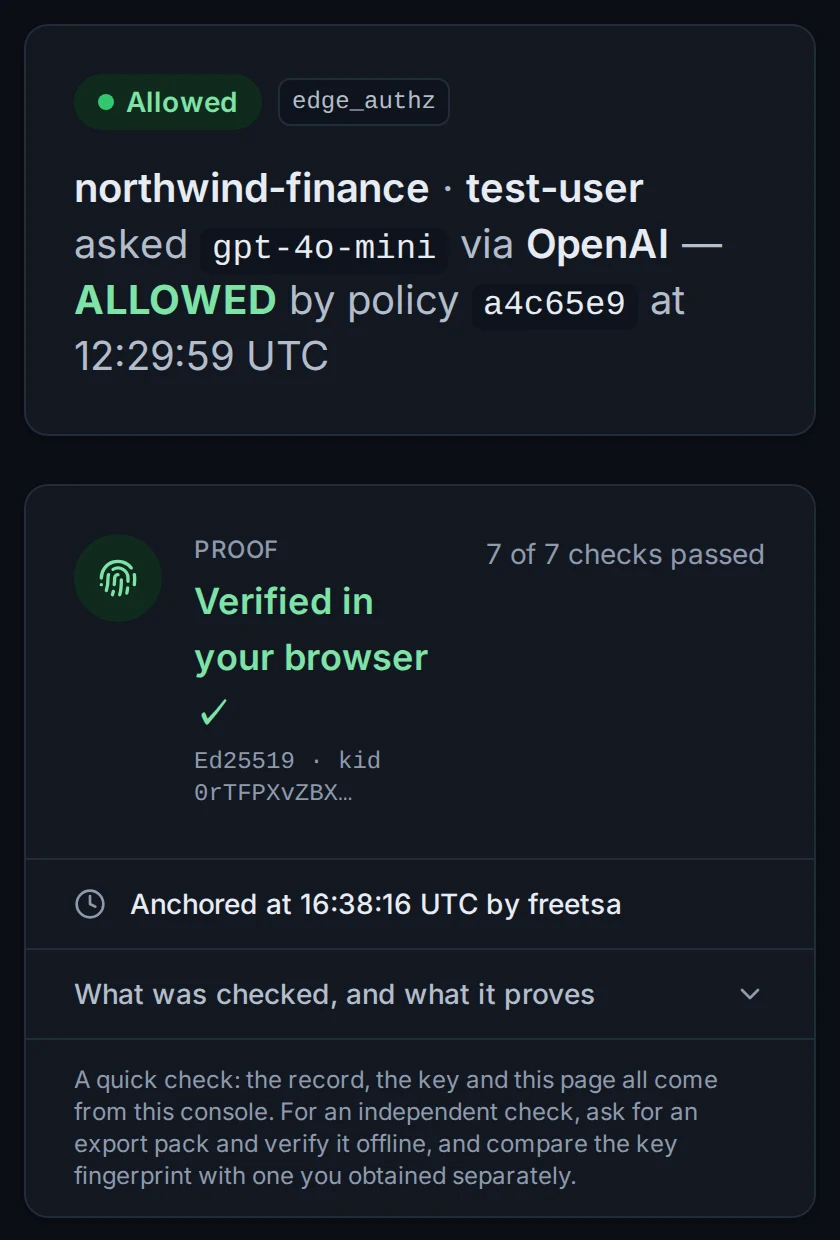 (opens the full-size image in a new tab)
Verify offline, step by step
- Download an export pack for a tenant and a date range. In the console, a guest auditor can download one.
- Take the verification script, verify-evidence.py, out of the pack. It is a single Python file you can read before you run it. The pack also holds the records, the public keys, a signed manifest, the anchors with their timestamp tokens and a README; the script reads those from the zip itself.
- Get the timestamp authority roots you trust from the authorities themselves, and list them in a roots file. Roots inside the pack are never trusted.
- Install Python 3.9 or later with the packages the script names (cryptography, and asn1crypto for anchors).
- Run the script, as shown below. It needs no network access and no PolicyGate account.
python3 verify-evidence.py --input evidence-acme.zip --tsa-roots tsa-roots.jsonANCHORED: seq 1..5 covered by freetsa (www.freetsa.org) at 2026-11-07T16:10:02Z (anchor 1)
NOT YET ANCHORED: seq 6..7 (after 2026-11-07T16:10:02Z)FAIL: first bad seq <n> (<why>)A result line starting with "OK:" and exit code 0 mean: the manifest signature is valid, the files match the manifest's hashes, every record's signature and hash hold, the sequence is contiguous with every link intact, and the chain head matches where it was exported.
To check one agent payment, pass the payment signature with --match-payment. The script reports whether a policy decision in the pack covers that payment, and whether it is anchored.
Check it yourself
The verifier is public. It is a single Python file that checks an evidence pack offline, from files only. The repository also holds a sample pack, a tampered copy that fails, and the format specification, so anyone can write their own verifier.
github.com/policygate-ai/evidence-verifier
Reference deployment
The sample pack comes from PolicyGate's own reference deployment. To verify it, pin these two values.
- Signing key id
0rTFPXvZBXeF6fNuK8MDDc-mN6_PAAaVT60mzCGEDEk- Anchoring since
2026-11-07T16:07:00Z
In a real audit, both values come from the organisation that runs PolicyGate, through a separate channel, not from this page.
What this proves, and what it doesn't
It proves
- That a decision with this content was signed by the holder of the evidence key.
- That no record in the chain was changed, removed, reordered or inserted after it was signed.
- That an anchored record existed at the time of its timestamp, and was not rewritten or deleted afterwards.
It does not prove
- That a model's answer was correct or safe. PolicyGate does not judge content.
- Anything about records newer than the last anchor beyond their signature and chain, until the next anchor covers them.
- That a new decision was not invented by whoever holds the signing key. That depends on how the key is protected.
- Any legal effect. A timestamp is not a legal certification.
- One pack cannot show that nothing newer was left out. An auditor closes that gap with an earlier pack or with their own record of anchors.
Independent monitoring
An auditor or a customer can run a small monitor on a machine the operator doesn't control. Through an authenticated, read-only route it fetches the latest anchor, checks the timestamp against pinned roots and confirms that the history continues from the last anchor it saw. If the history forks, goes backwards or stops being anchored, it raises an alert.
What an auditor should ask for
- Confirmation that evidence recording and anchoring are switched on. Both are installation options.
- An export pack for the period under review.
- The evidence public key fingerprints, delivered through a separate channel.
- The list of timestamp authorities in use, so you can obtain and pin their roots yourself.
- The active policy and its signer. The console shows the signer and a cosign command to check it.
- A read-only anchor-monitor credential, if you want to watch the anchors yourself.